By Rob Arnold, Founder and CEO, Ascendea
There is a particular kind of tiredness that comes from being the person who has to remember everything.
Not the work itself. The remembering. Chasing the quote that went out eleven days ago. Checking whether the client who went quiet is annoyed or simply busy. Noticing on Thursday that nobody has looked at last week’s numbers. None of these tasks is difficult. All of them depend entirely on you holding them in your head, and every one of them fails the week you are ill or on holiday or genuinely busy with something that matters more.
Most business owners treat this as a discipline problem. Better systems, better calendar habits, a tighter Monday routine. It is not a discipline problem. It is a design problem, and it is the one that loop engineering solves.
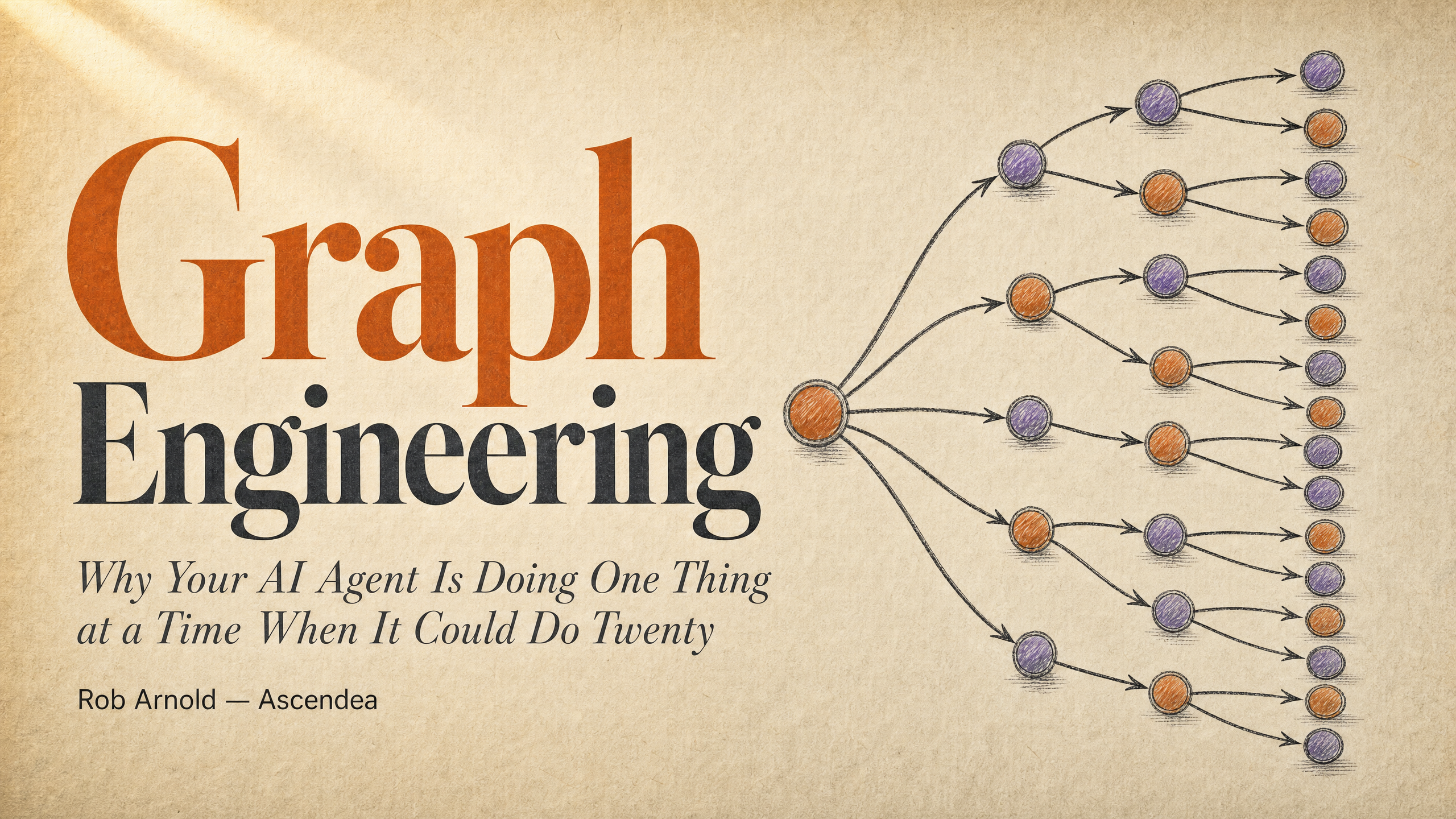
This is the third article in a series. The first covered memory engineering, which is how an AI retains what it has learned about your business rather than starting from zero every session. The second covered graph engineering, which is how AI work fans out to happen simultaneously rather than queuing in a line. Both of those made the AI better at doing what you asked. This one is about something different: making the AI operate the cycle itself, so that the work happens whether or not you remembered to ask.
What Is Loop Engineering, in Plain Terms?
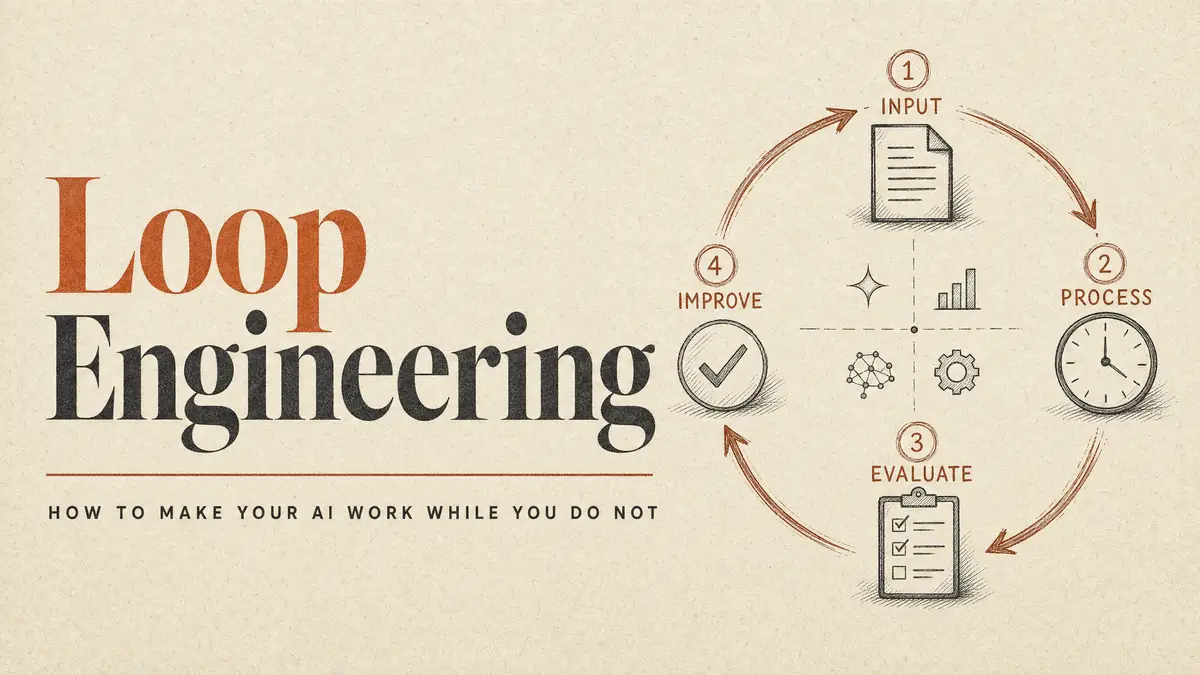
A loop is a cycle of work that repeats until a condition is met.
You already run dozens of them. Your credit control process is a loop: send the invoice, wait, check whether it has been paid, chase if not, repeat until the money arrives or you write it off. Your recruitment process is a loop. Your sales follow-up is a loop. Each one has a repeating action, a check, and a stopping point.
The important distinction is not whether the loop exists. It is who operates it.
At the moment, in most SMEs, the answer is a person. Someone remembers to check the aged debtors report. Someone notices that a candidate has not replied. Someone decides that four chase emails is enough. The loop is real, but the engine driving it is human attention, which is the scarcest and most expensive resource in a small business.
Loop engineering means handing the operation of the cycle to the AI. You define the goal, the boundaries, and the stopping condition. The AI runs the cycle, checks its own progress, and either finishes or stops and tells you why.
The business analogy I find most useful: this is the difference between being a supervisor who watches every step and being a manager who delegates an outcome. A supervisor says “send the email, then tell me, then I will tell you what to do next.” A manager says “chase this until we have an answer or you have tried five times, then report back.” The second one is not working harder. They have simply stopped being the mechanism.
Anyone who has grown a business past their own capacity recognises this shift. It is the same one that happens when you hire your first proper manager. The work does not change. What changes is that you stop being the thing that makes it happen.
The Three Instructions That Make Loops Work
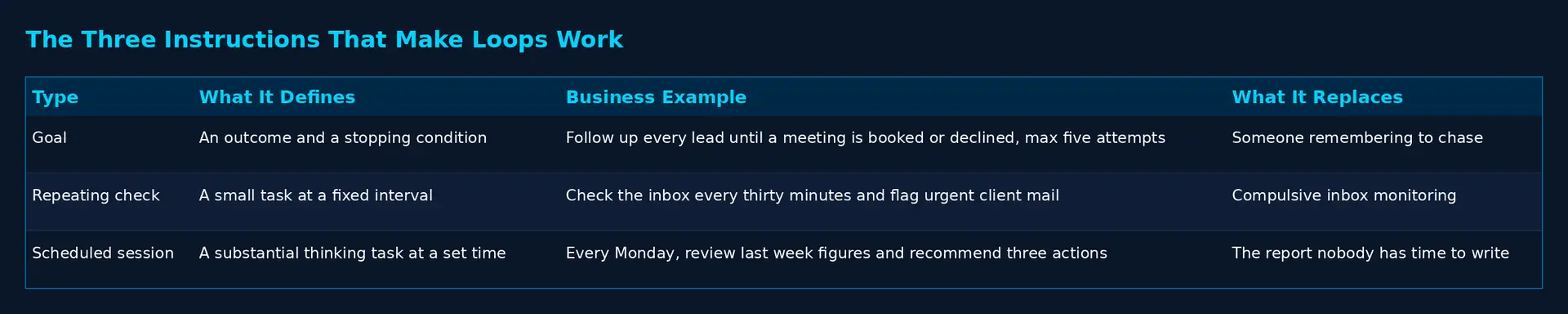
In practical terms, loop engineering rests on three kinds of instruction. The exact command names vary between tools and change between releases, so I am going to describe what each one does rather than fixate on syntax. In Claude Code these currently appear as /goal, /loop and /schedule, though I would recommend confirming current naming in the documentation before you build anything that matters on it.
Defining the Finish Line
The first instruction defines the outcome and the stopping condition. Not the task. The outcome.
Here is one I use in my own business:
Follow up with every lead from this week until each one has a meeting booked or has declined. Stop after five attempts per lead.
Read that carefully, because the structure matters more than the wording. There is an outcome, which is a meeting booked or a clear decline. There is a boundary, which is five attempts. And there is an implicit instruction that the AI keeps going until one of those two conditions is met, without being reminded.
Compare that to how most people use AI: “write me a follow-up email for this lead.” That produces one email. You then have to remember to send the next one, decide when, and decide when to stop. The AI did the easy part and left you the part that actually requires attention.
The commercial difference is substantial. In most SMEs, leads do not go cold because the follow-up was badly written. They go cold because the fourth follow-up never happened, and it never happened because the person responsible was doing something else that felt more urgent. Defining a finish line and a boundary removes the need for anyone to remember.
Repeating a Check
The second instruction repeats a small check at an interval.
Check my inbox every thirty minutes and flag anything from a client that needs a response today.
This is not intelligent work. It is vigilance, and vigilance is precisely what humans are worst at. You cannot check your inbox every thirty minutes and also do focused work, and if you try, you will do both badly. What you actually do is check it compulsively for two hours and then not at all for six, which is when the urgent client email arrives.
The parallel here is a smoke alarm rather than a fire officer. You do not want something clever. You want something that never gets distracted and never decides it will look later.
Scheduling a Session
The third instruction schedules a substantial piece of work to happen at a set time.
Every Monday morning, review last week’s sales figures and write me a summary with three recommended actions.
This is the one that most surprises business owners when they first see it working, because it is not automation as they understand the word. Traditional automation moves data according to fixed rules: form submitted, row added to spreadsheet. This is a thinking session that happens on a schedule. It reads, it assesses, it forms a view, and it produces something a person would have needed two hours to produce.
The distinction that matters commercially is that the output requires judgement. “Three recommended actions” is not a data extract. It is an opinion, formed from evidence, delivered before you sit down. You may disagree with all three, and that is fine, because arguing with a draft is a considerably faster route to a decision than starting from a blank page.
The Four Phases Every Good Loop Moves Through
A loop that works is not simply an instruction repeated. It moves through four distinct phases, and understanding them is what separates a loop that produces useful work from one that produces noise.
I will use a single worked example throughout: preparing the weekly client report, which is a task almost every service business does, almost every service business does late, and almost nobody enjoys.
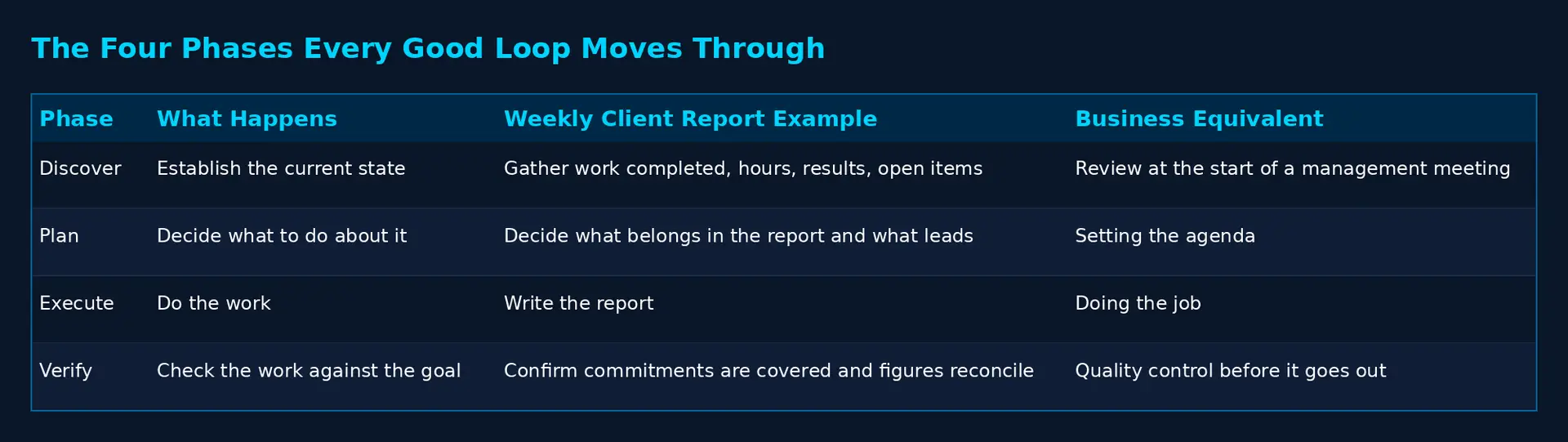
Phase One: Discover
The loop establishes the current state of things before it does anything.
For the weekly client report, that means gathering what actually happened: work completed, hours logged, results achieved, outstanding items, anything raised by the client during the week. This is the phase most people skip when they do this manually, which is why so many client reports are reconstructions from memory rather than records of fact.
The equivalent in a business context is the review at the start of a management meeting. Before deciding anything, establish where matters stand. Skip it and every subsequent decision rests on assumption.
Phase Two: Plan
The loop decides what to do with what it has found.
For the report, this means deciding what belongs in it. Not everything that happened is worth reporting. A client paying for a marketing retainer needs to know what moved and what it produced, not a list of every internal task. The plan phase decides on structure and emphasis: what leads, what supports, what gets left out, and what needs flagging as a risk.
This is where the memory work from the first article in this series pays for itself. A loop with no memory produces a generically correct report. A loop that knows this particular client cares about lead volume rather than impressions, prefers brevity, and reacted badly last time to being told about a delay after the fact, produces a report that reads as though a person who knows them wrote it. That difference is not cosmetic. It is most of the perceived value of a client report.
Phase Three: Execute
The loop does the work. It writes the report.
Nothing subtle here, and that is worth saying plainly, because execution is the phase everybody assumes is the hard part. It is not. Producing a competent draft from good inputs and a clear plan is the most reliable thing an AI does. The failures almost always sit either side of it: bad inputs going in, or no verification coming out.
Phase Four: Verify
The loop checks its own work against the goal, and this is the phase that determines whether the whole thing is worth having.
For the report, verification asks: does this cover every commitment made this week? Are the figures consistent with the source data? Does it flag the overdue item rather than quietly omitting it? Is it in the format this client expects?
If verification fails, the loop returns to the plan phase and goes again. That is what makes it a loop rather than a sequence. It does not stop when it has produced something. It stops when it has produced something that passes.
One caution carried over from the graph engineering article, because it applies with equal force here. An AI checking its own work is a soft marker. It has a documented preference for its own output and will find its own draft acceptable more readily than a third party would. Where the output matters commercially, verification should be a separate step with clean instructions and no knowledge of how the draft was produced. It should be given the draft and the standard, and asked whether one meets the other. Nothing else.
What Separates a Good Loop From a Dangerous One
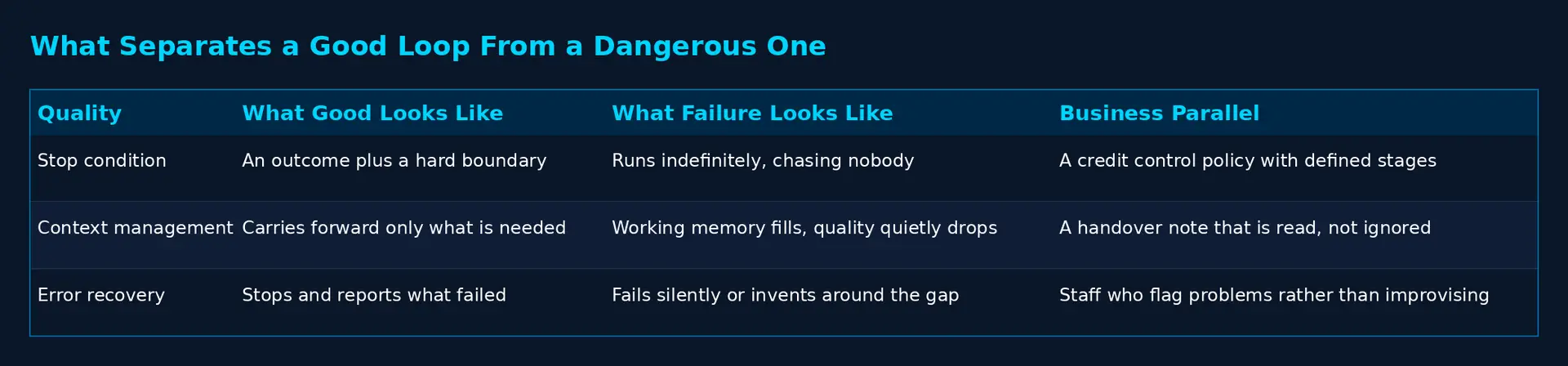
Three qualities determine whether a loop is an asset or a liability. I want to be direct about this, because a badly designed loop is worse than no loop at all. A task you forgot to do is a gap. A loop that runs incorrectly and unsupervised is a process producing wrong output at volume, with nobody watching.
A Clear Stop Condition
Every loop needs an unambiguous definition of done, and a boundary for the case where done is never reached.
“Follow up with this lead until they respond” has no stop condition. If they never respond, the loop never ends, and you have built something that will email a disinterested prospect indefinitely. “Until a meeting is booked or they decline, maximum five attempts” has two exits: the outcome, and the boundary.
The business parallel is a credit control policy. “Chase until they pay” is not a policy, it is a hope. “Three reminders, then a formal letter, then it goes to collections” is a policy, because it defines what happens when the desired outcome does not arrive. Every loop needs the equivalent.
I would go further. Write the boundary before you write the goal. It is the part everyone forgets, and it is the part that prevents embarrassment.
Context Management
A loop that runs repeatedly accumulates information, and every AI has a working memory limit. Reach it and quality degrades: earlier instructions get forgotten, the loop starts contradicting itself, output becomes unreliable in ways that are not immediately obvious.
A well designed loop carries forward only what the next cycle needs. For the report loop, that means carrying forward the client’s preferences, the outstanding items, and the standard to be met. It does not mean carrying forward the full text of every previous report.
The analogy is a handover note between shifts. A good handover contains what the next person needs to act on. A bad handover is a transcript of the entire shift, which nobody reads, so the important item gets missed.
This is where the memory engineering piece connects directly. Loops without deliberate memory design either forget what matters or drown in what does not. Neither produces reliable output over time, and the failure is gradual enough that you may not notice it for weeks.
Error Recovery
Things will go wrong. The data source will be unavailable. A figure will be missing. An instruction will turn out to be ambiguous. The question is what the loop does next.
There are three possible behaviours, and only one of them is acceptable. It can stop silently, which is the worst outcome, because you believe the work is happening and it is not. It can continue regardless and produce output built on a gap, which is worse still, because it looks finished. Or it can stop, report clearly what failed and why, and wait.
The third is the only design worth having. The parallel is a member of staff who tells you when they are blocked rather than either going quiet or improvising. Anyone who has managed people knows which of those they would rather employ.
Where Loops Stop Being the Right Answer
Loops are not a general solution, and the honest limitations matter more than the possibilities.
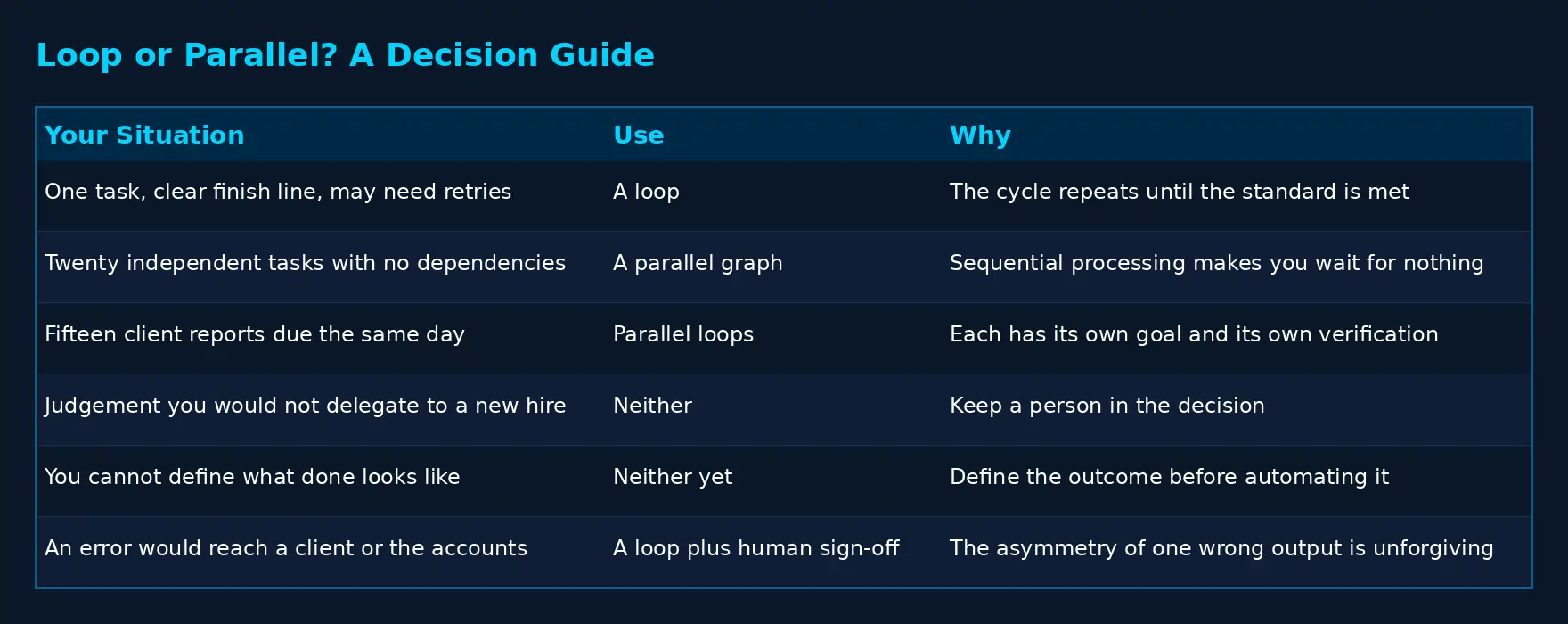
A loop is the wrong choice when the task requires judgement you would not delegate. Deciding whether to end a client relationship, set a price, or restructure a team is not loop work, regardless of how well specified the goal is. The test I apply: if I would not let a competent new employee make this call unsupervised in their first month, it does not go in a loop.
A loop is also wrong when the stopping condition cannot be defined. If you cannot state what done looks like, the problem is not the tool. You do not yet understand the task well enough to delegate it to anyone, human or otherwise.
And a loop is wrong when the cost of an undetected error exceeds the value of the time saved. Anything client-facing, financial, or legally consequential needs a human between the output and the outside world. Not because the AI is unreliable, but because the asymmetry is unforgiving: fifty correct outputs do not compensate for one wrong invoice sent to a client.
There is one further limitation worth drawing out, because it connects directly to the previous article in this series.
A loop is fundamentally sequential. It is one cycle, repeating: discover, plan, execute, verify, and round again. That is exactly right for a single piece of work with a clear finish line. It is exactly wrong when you have twenty independent pieces of work that do not depend on each other, because a loop will process them one at a time while you wait.
That is the problem graph engineering solves. Where a loop repeats one cycle until done, a graph fans work out so that independent tasks happen simultaneously and converge only where they must. The two are complementary rather than competing. In practice, the useful pattern is a graph of loops: several independent loops running in parallel, each with its own goal and boundary, each verifying its own work.
The weekly client report makes this concrete. If you have one client, a loop is correct. If you have fifteen clients, running fifteen report loops sequentially means the last client’s report is produced considerably later than the first, for no reason other than the shape you drew. Fifteen loops running in parallel finish in roughly the time of the slowest one.
There is also a known failure mode in single loops that deserves naming, because it is genuinely dangerous in a business context. A loop optimises for the condition you gave it, and only that condition. Tie a support loop to ticket resolution time and it will learn to close tickets quickly, which is not the same as solving problems. The number improves while the underlying situation deteriorates, and the loop cannot tell you, because it is measuring the thing you asked it to measure. This is why loops need anchors they are not permitted to adjust, and why a network of loops that check each other is more trustworthy than a single loop optimising hard against one number.
Where to Start
If this is new to you, the sequence matters. Building the most valuable loop first is the standard mistake, because the most valuable loop is usually also the one where errors cost most.
- Start with something where a mistake is cheap. The inbox check is a good first loop for exactly this reason. If it flags something that did not need flagging, you have lost four seconds. If it misses something, you would have missed it anyway. The downside is bounded and you learn how the mechanism behaves.
- Then move to a scheduled session that produces a draft rather than an action. The Monday figures summary is the obvious candidate. It produces something genuinely useful, it requires judgement, and because it lands as a draft for you to read rather than an action sent to a third party, the verification step is you reading it.
- Only then move to a loop that acts on the outside world, such as lead follow-up. And when you do, set the boundary deliberately low at first. Two attempts, not five. Watch what it sends. Raise the boundary when you have read enough output to trust it.
The pattern across all three: the constraint is not what the AI can do. It is how much you have verified. Build the verification habit on cheap loops and you can extend it to expensive ones. Skip it and you will eventually discover a loop has been producing something embarrassing for a fortnight.
Frequently Asked Questions
What is loop engineering in AI?
Loop engineering is the practice of designing repeating cycles of work that an AI operates independently, rather than a person operating them step by step. A well designed loop has a defined goal, a stopping condition, a boundary for when the goal cannot be reached, and a verification step that checks the output before finishing.
How is loop engineering different from normal automation?
Traditional automation follows fixed rules and moves data between systems. A loop runs a cycle that involves judgement: it establishes the current state, decides what to do, does it, then checks its own work against the goal and repeats if the standard has not been met. Automation executes a rule. A loop pursues an outcome.
Can a small business use AI loops without a developer?
Yes, for the straightforward cases. Repeating checks and scheduled summary sessions can be set up by a non-technical business owner in modern AI tools. Loops that act on the outside world, such as sending client emails or updating records, warrant either technical support or professional design, because the cost of an unnoticed error is higher.
What is the biggest risk with AI loops?
A loop that fails silently while you believe it is working. The second biggest is a loop with no boundary, which continues indefinitely because the desired outcome never arrives. Both are design faults rather than technology faults, and both are prevented by defining the stopping condition and the failure behaviour before the loop goes live.
Should I use loops or parallel workflows for my business?
Use a loop when you have one piece of work with a clear finish line that may need several attempts. Use a parallel approach when you have multiple independent pieces of work that do not depend on each other. Most real operations need both: several loops running at the same time, each with its own goal and its own verification.
The Shift Worth Taking From This
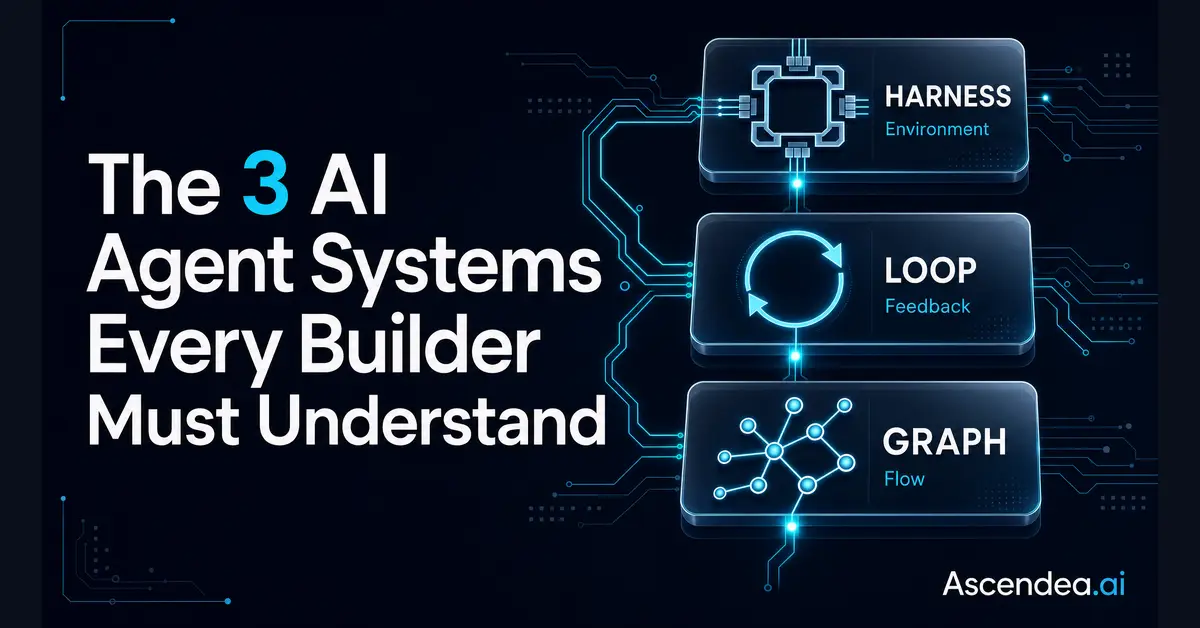
The three articles in this series describe the same change from three directions. Memory engineering is an AI that knows your business. Graph engineering is an AI that works in parallel rather than in a queue. Loop engineering is an AI that operates the cycle rather than waiting to be operated.
Taken together they describe a shift most business owners recognise from an entirely different context. It is the shift from doing the work, to supervising the work, to designing the system that does the work. Every owner who has grown a business past their own capacity has made that transition with people. The same transition is now available with software, and the businesses that make it will find they have capacity that their competitors are still spending on remembering things.
The tiredness I described at the start of this article is not a sign that you need better discipline. It is a sign that you are still the engine. That is a design decision, and it is one you can change.
Where to Go From Here
The concepts here are not difficult. What takes time is working out which of your recurring processes are genuine loop candidates, defining stopping conditions that hold up under real conditions, and building the verification that stops a helpful system becoming an unsupervised liability.
That is the work I do. Through Ascendea’s Fractional AI Officer service, I work with SME leadership teams to identify where AI produces real commercial return and then design the systems that deliver it. Through the Applied AI Masterclass, a nine-module programme, I teach business owners and their teams to design this themselves.
If you want to work out which loops would make a difference to your operation, book a strategy call at ascendea.ai. Bring the three things you are tired of remembering. That is almost always where the first loop is hiding.
This is the third article in a four-part series on AI engineering for SMEs. Part one covered memory engineering, how AI retains knowledge of your business. Part two covered graph engineering, how AI work happens in parallel. Part four covers the practical toolkit: the twelve Claude Code features that matter for business owners.
Rob Arnold is Founder and CEO of Ascendea, an AI consultancy helping UK SMEs apply artificial intelligence to real commercial problems. He delivers Fractional AI Officer services to growing businesses and leads the Applied AI Masterclass programme.